ScrollLabs

Collect and organise website enquiries for service businesses

Turn website enquiries into clear next steps.

For service businesses that quote, schedule and follow up. A chat on your website asks about the job, flags what is missing and puts each enquiry in one inbox. Your team replies from its own email or phone.

Run a cleaning business? See how it works for cleaning businesses

Interactive demo · Sample details only

Interactive demo

Wattle & Wren Home Cleaning (fictional)

Follow-up preference

Industry

Step 1 of 7

Replay and Reset keep your follow-up preference.

Customer · website chat

  1. Assistant: Hi! Welcome to Wattle & Wren. What type of clean do you need?

  2. Customer: Hi, I need an end of lease clean for a 2 bedroom apartment in Brunswick

  3. Assistant: Got it — an end-of-lease clean, an apartment, 2 bedrooms, in Brunswick. How many bathrooms?

What came of it

Not asked yet

  • Not yet: Qualified
  • Not yet: Question answered
  • Not yet: Sample email recorded
  • Not yet: In the owner inbox

Preview only: no emails are sent and no calls are placed.

Interactive demo · Sample details only.

The service

One service: ScrollLabs Receptionist.

A supervised pilot for owner-run cleaning businesses that quote from website enquiries and reply to customers themselves. No business uses it yet.

Pilot

ScrollLabs Receptionist

A rules-based chat on your website that asks about the job, and a shared inbox where your team sees each enquiry organised.

  • Collects the job, the property, the suburb, a preferred time and how to reach the customer, and flags what is missing
  • A customer can ask for a person; the enquiry is then marked for your team
  • Your team replies from its own email or phone
Set up for you

What is included

  • The chat on one website
  • Up to 100 enquiries a month
  • An inbox for up to 3 staff logins
  • An email to your team when an enquiry needs a person
  • Hosting and standard maintenance: updates, security fixes and keeping it running
  • Keeping and deleting enquiry data on the agreed schedule: we do it, not you

You reply to every customer yourself, from your own email or phone.

What came of it

Interactive demo

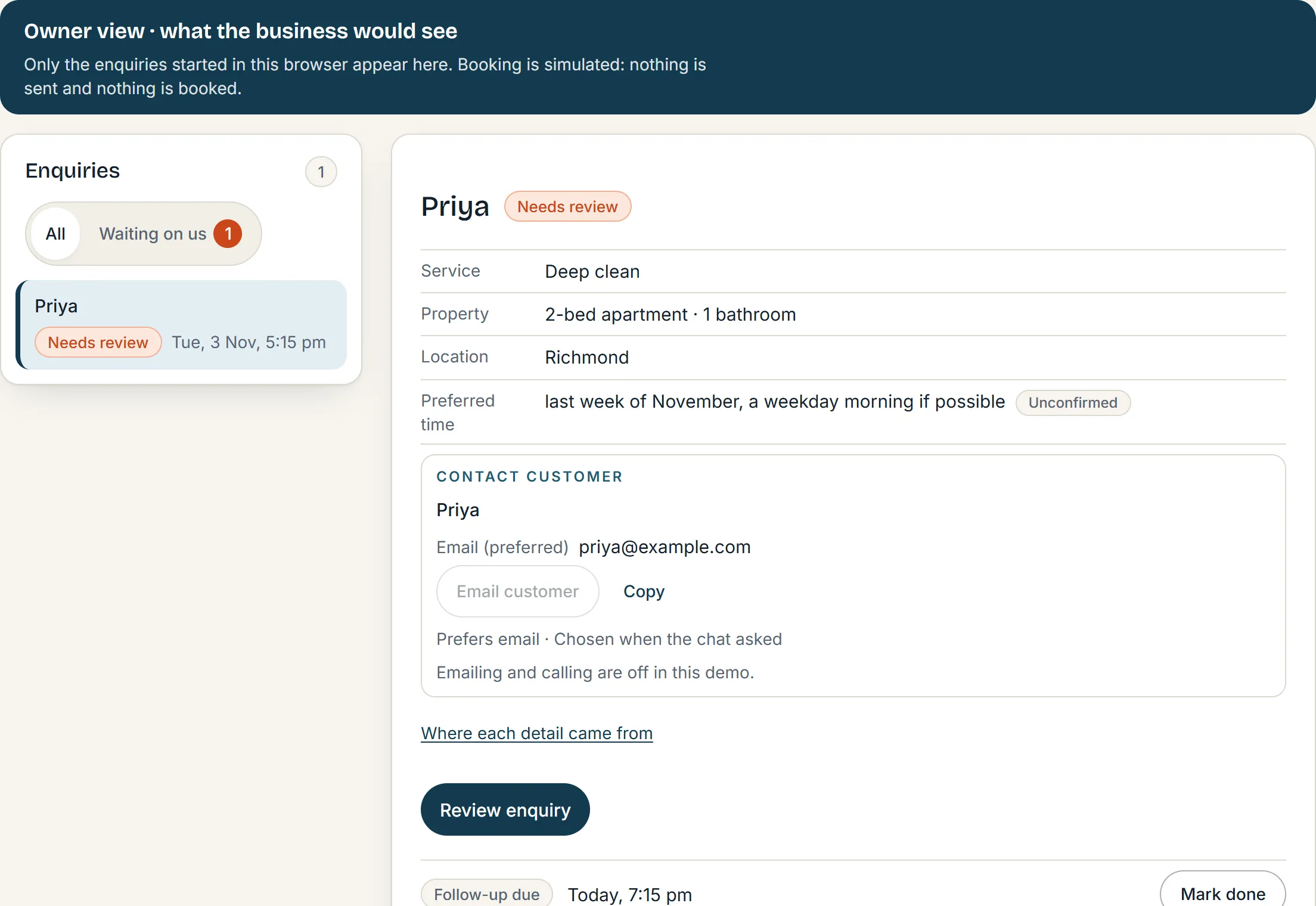
Your side: one inbox, ready for your reply.

The same enquiry as the customer saw it, now as your team reads it: status, the details, a suggested reply to edit, and the next step.

  1. Needs attention, up front

    What is unsure or missing is listed at the top of the enquiry, not buried in a transcript.

  2. Every detail says where it came from

    Customer said it, the chat inferred it, or staff set it. Nothing is presented as more certain than it is.

  3. No contact? It says so

    An enquiry without a contact detail is marked plainly, and never pretends the customer can be reached.

The demo's owner view, headed Owner view, what the business would see, with the note that booking is simulated and nothing is sent or booked: the enquiry list shows Priya marked Needs review; the details come first (deep clean, a 2-bed apartment with 1 bathroom, Richmond, a preferred time marked Unconfirmed), then a Contact customer section with a sample email address marked preferred, a Copy button and the line that emailing and calling are off in this demo, then a Review enquiry button and the follow-up due time.
The owner view of the interactive demo, captured as it runs. The business and the customer are made up.

How it works

From the first message to your follow-up, in four steps.

How an enquiry moves through ScrollLabs Receptionist1. Website enquiry: The customer types what they need; the chat asks one question at a time and answers approved FAQs. 2. Handoff or contact choice: A request for a person pauses the questions. Otherwise the customer chooses email or a phone call, or skips. 3. Owner review: The enquiry waits in the owner inbox with its details, what needs attention and a suggested reply to approve. 4. Staff follow up: A person emails or phones the customer from their own email or phone. ScrollLabs only sends your team an alert.1Website enquiry2Handoff or contact choice3Owner review4Staff follow up
  1. 1. Website enquiry. The customer types what they need; the chat asks one question at a time and answers approved FAQs.
  2. 2. Handoff or contact choice. A request for a person pauses the questions. Otherwise the customer chooses email or a phone call, or skips.
  3. 3. Owner review. The enquiry waits in the owner inbox with its details, what needs attention and a suggested reply to approve.
  4. 4. Staff follow up. A person emails or phones the customer from their own email or phone. ScrollLabs only sends your team an alert.
  1. Step 1: Enquiry

    A customer writes in the chat on your website and answers a few short questions.

  2. Step 2: Contact or handoff

    They say how they would like to be followed up, or ask for a person, and the enquiry is marked for your team.

  3. Step 3: Owner review

    Your team opens the enquiry, sees what is unsure or missing, and edits the suggested reply.

  4. Step 4: You follow up

    Staff send the reply from their own email or phone the customer, and book the job themselves.

When it can’t help: it marks the enquiry for your team. If a message sounds urgent, the chat shows safety advice and flags it. Its own replies are automated and labelled; every email, text or call to a customer comes from your team.

Industries

For service businesses that quote, schedule and follow up.

Cleaning is the business in the demo, and the one we work with now. The other examples are illustrations: the questions would differ. Pick one to see it.

  • Cleaning

    Interactive demo
    • Regular, deep or end-of-lease
    • Apartment or house, bedrooms and bathrooms
    • Suburb and a preferred time
    Cleaning example →
  • Trades & home services

    Illustration
    • What has failed and how urgent it is
    • The system, its age and the access
    • Whether an agent or owner must approve
    Trades example →
  • Pest control

    Illustration
    • What was seen or heard, and where
    • The property and the roof or garden
    • A time that suits for an inspection
  • Garden care

    Illustration
    • Mowing, hedging or a one-off tidy
    • The size of the garden and the hedges
    • How often, and which day suits
Illustration

Harbourline Plumbing (illustration)

Industry

Step 1 of 4

Replay and Reset keep your follow-up preference.

Customer · website chat

Illustration
  1. Assistant: Hi! Welcome to Harbourline Plumbing. What do you need help with?

  2. Customer: Our hot water system stopped working this morning

  3. Assistant: Got it — no hot water since this morning. Is it a gas or electric system, and roughly how old?

What came of it

Not asked yet

  • Not yet: Urgency noted
  • Not yet: Phone call preferred
  • Not yet: In the owner inbox

Preview only: no emails are sent and no calls are placed.

An illustration of the same workflow for a trades business. Scripted, not run by the engine; the business is invented.

Availability

What you can try now, and what setup adds.

Nothing starts until it is agreed with you in writing.

Try or ask
  • Interactive demo

    A demonstration, not a live service: chat as a customer of a made-up cleaning business, then see the same enquiry from the owner's side.

  • Ask about a health check

    The Free Automation Health Check: one automation workflow looked at by hand, by email, with up to three things worth checking.

Pilot
  • Your chat, on your website

    The same questions and handover as the demo, set up with your services, FAQs and suburbs.

  • A shared inbox for your team

    Sign in, claim an enquiry, leave a note for your team, and see who did what.

  • An email when an enquiry needs a person

    Sent to your team with a short summary and a link. Never sent to the customer.

  • Real customer details

    Switched on only once the privacy notice is agreed with you.

Not included

Replies written by AI, phone calls, booking, messages sent to customers and website care are not included.

See what is included

Questions

Asked before anything else.

Is the demo a real business?

No. Wattle & Wren Home Cleaning is made up. Use sample details only: nothing you type in the demo is sent to anyone, nobody is notified and nothing is booked.

Does it reply to customers or book jobs by itself?

Only inside the chat: its questions and approved answers are automated and labelled. It never emails, texts or calls customers, and never books a job; your team does that.

Does it take phone calls?

No. It is a text chat on your website. If a customer would rather talk, your staff phone them back.

Who uses ScrollLabs Receptionist today?

No business yet. We set it up for a small number of cleaning businesses at a time, once the scope, the fees and the privacy notice are agreed in writing.

What happens to customer details?

They are kept for your business only, behind your team's sign-in, for an agreed period, then erased. Real customer details are switched on only once the privacy notice is agreed with you. Emails already sent to your team are not erased.

Do you look after websites too?

Not at the moment. ScrollLabs offers one service, ScrollLabs Receptionist, and the free Automation Health Check you can ask about.

Pricing

Launch prices.

A$99a month, or A$990 a year, paid up front

No setup fee. No GST is charged: ScrollLabs is not registered for GST. Not live yet: nothing is charged before we agree the scope in writing.

See what is included
Ask about a health check

Free Automation Health Check

One workflow on n8n, Zapier, Make, Power Automate or similar, looked at by hand. Up to three things worth checking, with next steps. Not a security audit; finding nothing is a valid result. First five businesses we accept.

Email ScrollLabs

Ask about ScrollLabs

Tell us about your business and what you would want help with first. Email us to discuss your enquiry.

Please leave out passwords and any customer details.